This is the multi-page printable view of this section. Click here to print.
Consumption Patterns
1 - Exactly once semantics
EOS consumer (isolation.level=read_committed) is enabled by default since librdkafka 1.2.0, so for ClickHouse® - since 20.2
See:
BUT: while EOS semantics will guarantee you that no duplicates will happen on the Kafka side (i.e. even if you produce the same messages few times it will be consumed once), but ClickHouse as a Kafka client can currently guarantee only at-least-once. And in some corner cases (connection lost etc) you can get duplicates.
We need to have something like transactions on ClickHouse side to be able to avoid that. Adding something like simple transactions is in plans for Y2022.
block-aggregator by eBay
Block Aggregator is a data loader that subscribes to Kafka topics, aggregates the Kafka messages into blocks that follow the ClickHouse’s table schemas, and then inserts the blocks into ClickHouse. Block Aggregator provides exactly-once delivery guarantee to load data from Kafka to ClickHouse. Block Aggregator utilizes Kafka’s metadata to keep track of blocks that are intended to send to ClickHouse, and later uses this metadata information to deterministically re-produce ClickHouse blocks for re-tries in case of failures. The identical blocks are guaranteed to be deduplicated by ClickHouse.
2 - Kafka parallel consuming
For very large topics when you need more parallelism (especially on the insert side) you may use several tables with the same pipeline (pre ClickHouse® 20.9) or enable kafka_thread_per_consumer (after 20.9).
kafka_num_consumers = N,
kafka_thread_per_consumer=1
Notes:
- the inserts will happen in parallel (without that setting inserts happen linearly)
- enough partitions are needed.
kafka_num_consumersis limited by number of physical cores (half of vCPUs).kafka_disable_num_consumers_limitcan be used to override the limit.background_message_broker_schedule_pool_sizeis 16 by default, you may need to increase if using more than 16 consumers
Before increasing kafka_num_consumers with keeping kafka_thread_per_consumer=0 may improve consumption & parsing speed, but flushing & committing still happens by a single thread there (so inserts are linear).
3 - Multiple MVs attached to Kafka table
Kafka Consumer is a thread inside the Kafka Engine table that is visible by Kafka monitoring tools like kafka-consumer-groups and in Clickhouse in system.kafka_consumers table.
Having multiple consumers increases ingesting parallelism and can significantly speed up event processing. However, it comes with a trade-off: it’s a CPU-intensive task, especially under high event load and/or complicated parsing of incoming data. Therefore, it’s crucial to create as many consumers as you really need and ensure you have enough CPU cores to handle them. We don’t recommend creating too many Kafka Engines per server because it could lead to uncontrolled CPU usage in situations like bulk data upload or catching up a huge kafka lag due to excessive parallelism of the ingesting process.
kafka_thread_per_consumer meaning
Consider a basic pipeline depicted as a Kafka table with 2 MVs attached. The Kafka broker has 2 topics and 4 partitions.
kafka_thread_per_consumer = 0
Kafka engine table will act as 2 consumers, but only 1 insert thread for both of them. It is important to note that the topic needs to have as many partitions as consumers. For this scenario, we use these settings:
kafka_num_consumers = 2
kafka_thread_per_consumer = 0
The same Kafka engine will create 2 streams, 1 for each consumer, and will join them in a union stream. And it will use 1 thread for inserting [ 2385 ]
This is how we can see it in the logs:
2022.11.09 17:49:34.282077 [ 2385 ] {} <Debug> StorageKafka (kafka_table): Started streaming to 2 attached views
How ClickHouse® calculates the number of threads depending on the
thread_per_consumersetting:auto stream_count = thread_per_consumer ? 1 : num_created_consumers; sources.reserve(stream_count); pipes.reserve(stream_count); for (size_t i = 0; i < stream_count; ++i) { ...... }
Details:
Also, a detailed graph of the pipeline:
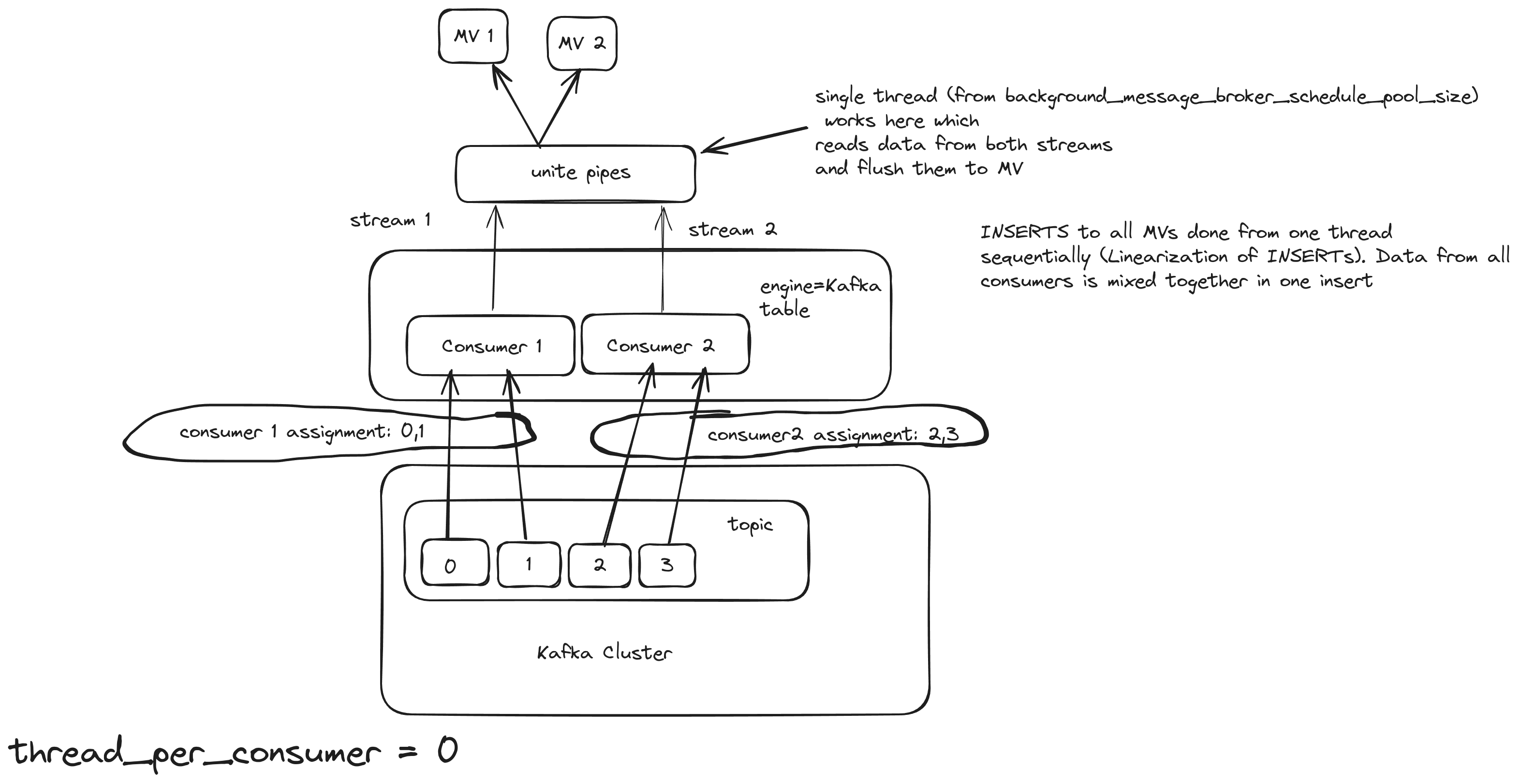
With this approach, even if the number of consumers increased, the Kafka engine will still use only 1 thread to flush. The consuming/processing rate will probably increase a bit, but not linearly. For example, 5 consumers will not consume 5 times faster. Also, a good property of this approach is the linearization of INSERTS, which means that the order of the inserts is preserved and sequential. This option is good for small/medium Kafka topics.
kafka_thread_per_consumer = 1
Kafka engine table will act as 2 consumers and 1 thread per consumer. For this scenario, we use these settings:
kafka_num_consumers = 2
kafka_thread_per_consumer = 1
Here, the pipeline works like this:
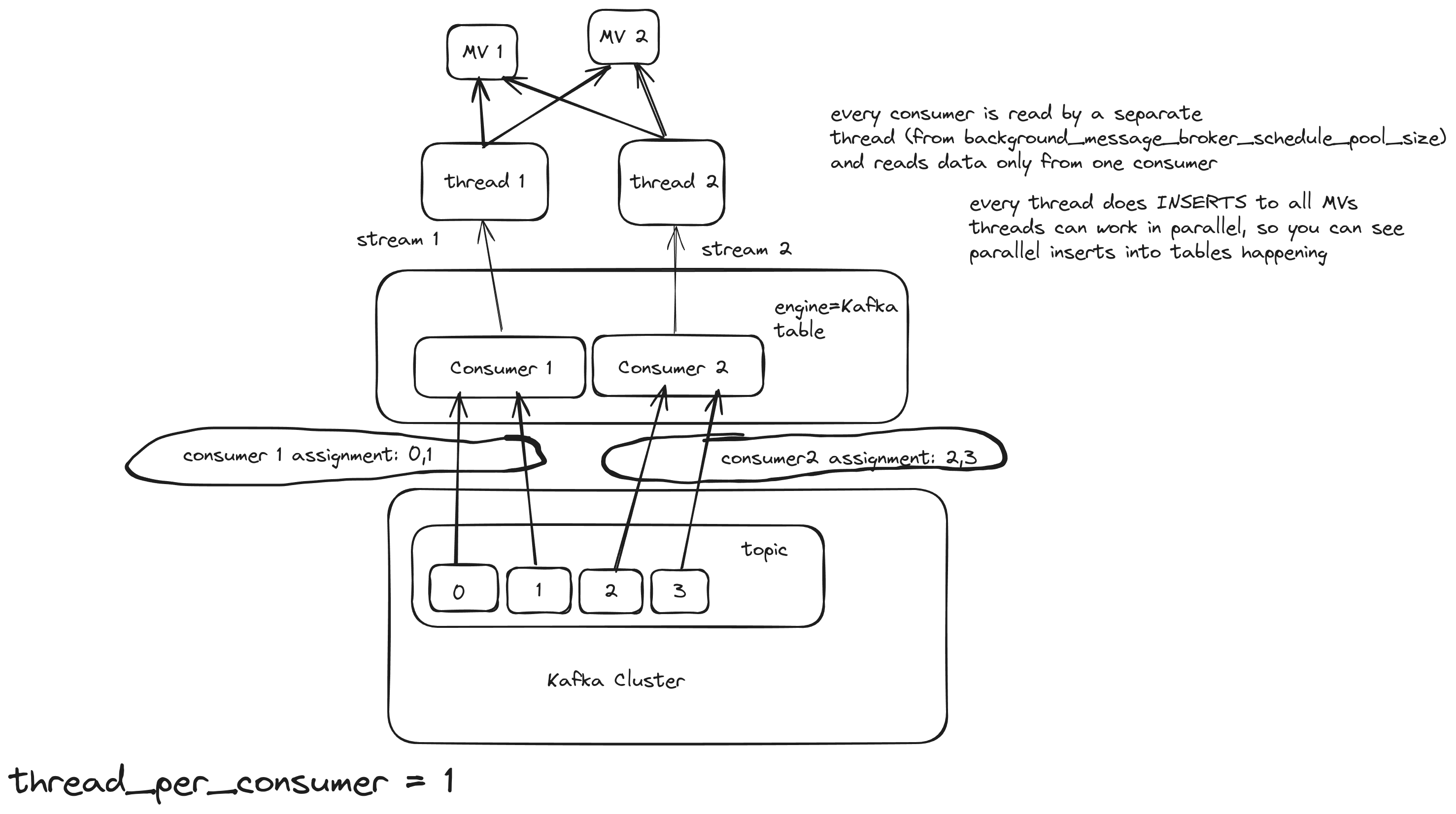
With this approach, the number of consumers remains the same, but each consumer will use their own insert/flush thread, and the consuming/processing rate should increase.
Background Pool
In Clickhouse there is a special thread pool for background processes, such as streaming engines. Its size is controlled by the background_message_broker_schedule_pool_size setting and is 16 by default. If you exceed this limit across all tables on the server, you’ll likely encounter continuous Kafka rebalances, which will slow down processing considerably. For a server with a lot of CPU cores, you can increase that limit to a higher value, like 20 or even 40. background_message_broker_schedule_pool_size = 20 allows you to create 5 Kafka Engine tables with 4 consumers each of them has its own insert thread. This option is good for large Kafka topics with millions of messages per second.
Multiple Materialized Views
Attaching multiple Materialized Views (MVs) to a Kafka Engine table can be used when you need to apply different transformations to the same topic and store the resulting data in different tables.
(This approach also applies to the other streaming engines - RabbitMQ, s3queue, etc).
All streaming engines begin processing data (reading from the source and producing insert blocks) only after at least one Materialized View is attached to the engine. Multiple Materialized Views can be connected to distribute data across various tables with different transformations. But how does it work when the server starts?
Once the first Materialized View (MV) is loaded, started, and attached to the Kafka/s3queue table, data consumption begins immediately—data is read from the source, pushed to the destination, and the pointers advance to the next position. However, any other MVs that haven’t started yet will miss the data consumed by the first MV, leading to some data loss.
This issue worsens with asynchronous table loading. Tables are only loaded upon first access, and the loading process takes time. When multiple MVs direct the data stream to different tables, some tables might be ready sooner than others. As soon as the first table becomes ready, data consumption starts, and any tables still loading will miss the data consumed during that interval, resulting in further data loss for those tables.
That means when you make a design with Multiple MVs async_load_databases should be switched off:
<async_load_databases>false</async_load_databases>
Also, you have to prevent starting to consume until all MVs are loaded and started. For that, you can add an additional Null table to the MV pipeline, so the Kafka table will pass the block to a single Null table first, and only then many MVs start their own transformations to many dest tables:
KafkaTable → dummy_MV -> NullTable -> [MV1, MV2, ….] → [Table1, Table2, …]
create table NullTable Engine=Null as KafkaTable;
create materialized view dummy_MV to NullTable
select * from KafkaTable
--WHERE NOT ignore(throwIf(if((uptime() < 120), 1 , 0)))
WHERE NOT ignore(throwIf(if((uptime() < 120), 1 + sleep(3), 0)))
120 seconds should be enough for loading all MVs.
Using an intermediate Null table is also preferable because it’s easier to make any changes with MVs:
- drop the dummy_MV to stop consuming
- make any changes to transforming MVs by drop/recreate
- create dummy_MV again to resume consuming
The fix for correctly starting multiple MVs will be available from 25.5 version - https://github.com/ClickHouse/ClickHouse/pull/72123
4 - Rewind / fast-forward / replay
- Step 1: Detach Kafka tables in ClickHouse®
DETACH TABLE db.kafka_table_name ON CLUSTER '{cluster}'; - Step 2:
kafka-consumer-groups.sh --bootstrap-server kafka:9092 --topic topic:0,1,2 --group id1 --reset-offsets --to-latest --execute - Step 3: Attach Kafka tables back
ATTACH TABLE db.kafka_table_name ON CLUSTER '{cluster}';
See also these configuration settings:
<kafka>
  <auto_offset_reset>smallest</auto_offset_reset>
</kafka>
About Offset Consuming
When a consumer joins the consumer group, the broker will check if it has a committed offset. If that is the case, then it will start from the latest offset. Both ClickHouse and librdKafka documentation state that the default value for auto_offset_reset is largest (or latest in new Kafka versions) but it is not, if the consumer is new:
conf.set("auto.offset.reset", "earliest"); // If no offset stored for this group, read all messages from the start
If there is no offset stored or it is out of range, for that particular consumer group, the consumer will start consuming from the beginning (earliest), and if there is some offset stored then it should use the latest.
The log retention policy influences which offset values correspond to the earliest and latest configurations. Consider a scenario where a topic has a retention policy set to 1 hour. Initially, you produce 5 messages, and then, after an hour, you publish 5 more messages. In this case, the latest offset will remain unchanged from the previous example. However, due to Kafka removing the earlier messages, the earliest available offset will not be 0; instead, it will be 5.