This is the multi-page printable view of this section. Click here to print.
Fundamentals
1 - Config by provider
Sometimes the consumer group needs to be explicitly allowed in the broker UI config.
Read Adjusting librdkafka settings first, then apply the provider-specific settings below.
Amazon MSK | SASL/SCRAM
<yandex>
  <kafka>
    <security_protocol>sasl_ssl</security_protocol>
    <!-- Depending on your broker config you may need to uncomment below sasl_mechanism -->
    <!-- <sasl_mechanism>SCRAM-SHA-512</sasl_mechanism> -->
    <sasl_username>root</sasl_username>
    <sasl_password>toor</sasl_password>
  </kafka>
</yandex>
- Broker ports detail
- Read here more (Russian language)
on-prem / self-hosted Kafka broker
<yandex>
  <kafka>
    <security_protocol>sasl_ssl</security_protocol>
    <sasl_mechanism>SCRAM-SHA-512</sasl_mechanism>
    <sasl_username>root</sasl_username>
    <sasl_password>toor</sasl_password>
    <!-- fullchain cert here -->
    <ssl_ca_location>/path/to/cert/fullchain.pem</ssl_ca_location>
  </kafka>
</yandex>
Inline Kafka certs
To connect to some Kafka cloud services you may need to use certificates.
If needed they can be converted to pem format and inlined into ClickHouse® config.xml Example:
<kafka>
<ssl_key_pem><![CDATA[
  RSA Private-Key: (3072 bit, 2 primes)
    ....
-----BEGIN RSA PRIVATE KEY-----
...
-----END RSA PRIVATE KEY-----
]]></ssl_key_pem>
<ssl_certificate_pem><![CDATA[
-----BEGIN CERTIFICATE-----
...
-----END CERTIFICATE-----
]]></ssl_certificate_pem>
</kafka>
See
https://help.aiven.io/en/articles/489572-getting-started-with-aiven-kafka
https://stackoverflow.com/questions/991758/how-to-get-pem-file-from-key-and-crt-files
Azure Event Hub
See https://github.com/ClickHouse/ClickHouse/issues/12609
Confluent Cloud / Google Cloud
<yandex>
  <kafka>
    <auto_offset_reset>smallest</auto_offset_reset>
    <security_protocol>SASL_SSL</security_protocol>
    <!-- older broker versions may need this below, for newer versions ignore -->
    <!-- <ssl_endpoint_identification_algorithm>https</ssl_endpoint_identification_algorithm> -->
    <sasl_mechanism>PLAIN</sasl_mechanism>
    <sasl_username>username</sasl_username>
    <sasl_password>password</sasl_password>
    <!-- Same as above here ignore if newer broker version -->
    <!-- <ssl_ca_location>probe</ssl_ca_location> -->
  </kafka>
</yandex>
2 - Kafka engine Virtual columns
Kafka engine virtual columns (built-in)
From the Kafka engine docs , the supported virtual columns are:
_topic— Kafka topic (LowCardinality(String))_key— message key (String)_offset— message offset (UInt64)_timestamp— message timestamp (Nullable(DateTime))_timestamp_ms— timestamp with millisecond precision (Nullable(DateTime64(3)))_partition— partition (UInt64)_headers.name— header keys (Array(String))_headers.value— header values (Array(String))
Extra virtual columns when you enable parse-error streaming:
If you set kafka_handle_error_mode='stream', ClickHouse adds:
_raw_message— the raw message that failed to parse (String)_error— the exception message from parsing failure (String)
Note: _raw_message and _error are populated only when parsing fails; otherwise they’re empty.
We can use these columns in a materialized view like this for example:
3 - Adjusting librdkafka settings
- To set rdkafka options - add to
<kafka>section inconfig.xmlor preferably use a separate file inconfig.d/:
Some random example using SSL certificates to authenticate:
<yandex>
    <kafka>
        <max_poll_interval_ms>60000</max_poll_interval_ms>
        <session_timeout_ms>60000</session_timeout_ms>
        <heartbeat_interval_ms>10000</heartbeat_interval_ms>
        <reconnect_backoff_ms>5000</reconnect_backoff_ms>
        <reconnect_backoff_max_ms>60000</reconnect_backoff_max_ms>
        <request_timeout_ms>20000</request_timeout_ms>
        <retry_backoff_ms>500</retry_backoff_ms>
        <message_max_bytes>20971520</message_max_bytes>
        <debug>all</debug><!-- only to get the errors -->
        <security_protocol>SSL</security_protocol>
        <ssl_ca_location>/etc/clickhouse-server/ssl/kafka-ca-qa.crt</ssl_ca_location>
        <ssl_certificate_location>/etc/clickhouse-server/ssl/client_clickhouse_client.pem</ssl_certificate_location>
        <ssl_key_location>/etc/clickhouse-server/ssl/client_clickhouse_client.key</ssl_key_location>
        <ssl_key_password>pass</ssl_key_password>
    </kafka>
</yandex>
Authentication / connectivity
Sometimes the consumer group needs to be explicitly allowed in the broker UI config.
Use general Kafka/librdkafka settings from this page first, then apply provider-specific options from Config by provider .
Kerberos
- https://clickhouse.tech/docs/en/engines/table-engines/integrations/kafka/#kafka-kerberos-support
- https://github.com/ClickHouse/ClickHouse/blob/master/tests/integration/test_storage_kerberized_kafka/configs/kafka.xml
  <!-- Kerberos-aware Kafka -->
  <kafka>
    <security_protocol>SASL_PLAINTEXT</security_protocol>
    <sasl_kerberos_keytab>/home/kafkauser/kafkauser.keytab</sasl_kerberos_keytab>
    <sasl_kerberos_principal>kafkauser/kafkahost@EXAMPLE.COM</sasl_kerberos_principal>
  </kafka>
How to test connection settings
Use kafkacat utility - it internally uses same library to access Kafla as ClickHouse itself and allows easily to test different settings.
kafkacat -b my_broker:9092 -C -o -10 -t my_topic \ (Google cloud and on-prem use 9092 port)
   -X security.protocol=SASL_SSL  \
   -X sasl.mechanisms=PLAIN \
   -X sasl.username=uerName \
   -X sasl.password=Password
Different configurations for different tables?
Is there some more documentation how to use this multiconfiguration for Kafka ?
The whole logic is here: https://github.com/ClickHouse/ClickHouse/blob/da4856a2be035260708fe2ba3ffb9e437d9b7fef/src/Storages/Kafka/StorageKafka.cpp#L466-L475
So it load the main config first, after that it load (with overwrites) the configs for all topics, listed in kafka_topic_list of the table.
Also since v21.12 it’s possible to use more straightforward way using named_collections: https://github.com/ClickHouse/ClickHouse/pull/31691
So you can write a config file something like this:
<clickhouse>
 <named_collections>
  <kafka_preset1>
   <kafka_broker_list>kafka1:19092</kafka_broker_list>
   <kafka_topic_list>conf</kafka_topic_list>
   <kafka_group_name>conf</kafka_group_name>
  </kafka_preset1>
 </named_collections>
</clickhouse>


<clickhouse>
    <named_collections>
        <kafka_preset2>
            <kafka_broker_list>...</kafka_broker_list>
            <kafka_topic_list>foo.bar</kafka_topic_list>
            <kafka_group_name>foo.bar.group</kafka_group_name>
            <kafka>
                <security_protocol>...</security_protocol>
                <sasl_mechanism>...</sasl_mechanism>
                <sasl_username>...</sasl_username>
                <sasl_password>...</sasl_password>
                <auto_offset_reset>smallest</auto_offset_reset>
                <ssl_endpoint_identification_algorithm>https</ssl_endpoint_identification_algorithm>
                <ssl_ca_location>probe</ssl_ca_location>
            </kafka>
        </kafka_preset2>
    </named_collections>
</clickhouse>
And after execute:
CREATE TABLE test.kafka (key UInt64, value UInt64) ENGINE = Kafka(kafka_preset1, kafka_format='CSV');
The same named collections can be created with SQL from v24.2+:
CREATE NAMED COLLECTION kafka_preset1 AS
    kafka_broker_list = 'kafka1:19092',
    kafka_topic_list = 'conf',
    kafka_group_name = 'conf';
CREATE NAMED COLLECTION kafka_preset2 AS
    kafka_broker_list = '...',
    kafka_topic_list = 'foo.bar',
    kafka_group_name = 'foo.bar.group',
    kafka.security_protocol = 'SASL_SSL',
    kafka.sasl_mechanism = 'PLAIN',
    kafka.sasl_username = '...',
    kafka.sasl_password = '...',
    kafka.auto_offset_reset = 'smallest',
    kafka.ssl_endpoint_identification_algorithm = 'https',
    kafka.ssl_ca_location = 'probe';
You can verify SQL-created named collections via:
SELECT
    name,
    source,
    create_query
FROM system.named_collections
WHERE name IN ('kafka_preset1', 'kafka_preset2');
and remove them with:
DROP NAMED COLLECTION kafka_preset1;
DROP NAMED COLLECTION kafka_preset2;
The same fragment of code in newer versions:
4 - Kafka main parsing loop
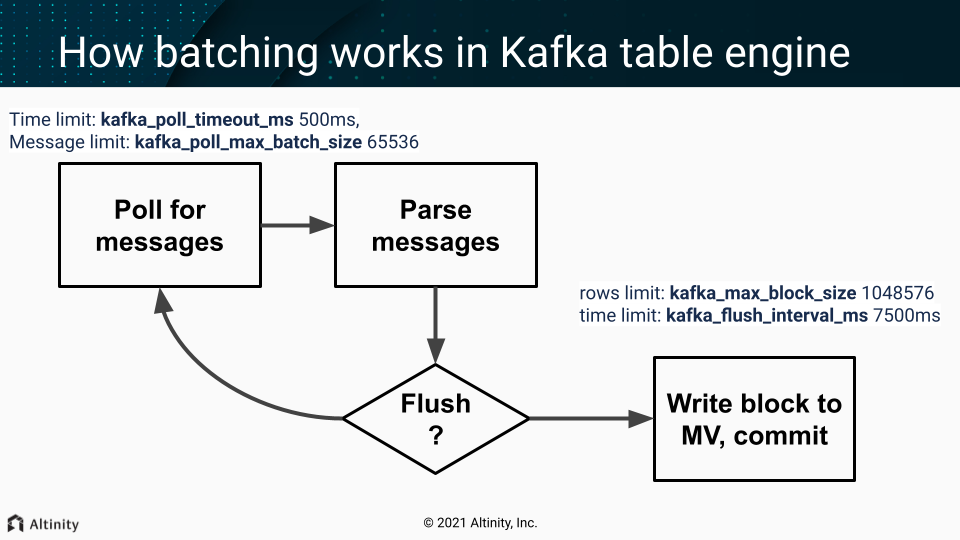
One of the threads from scheduled_pool (pre ClickHouse® 20.9) / background_message_broker_schedule_pool (after 20.9) do that in infinite loop:
- Batch poll (time limit:
kafka_poll_timeout_ms500ms, messages limit:kafka_poll_max_batch_size65536) - Parse messages.
- If we don’t have enough data (rows limit:
kafka_max_block_size1048576) or time limit reached (kafka_flush_interval_ms7500ms) - continue polling (goto p.1) - Write a collected block of data to MV
- Do commit (commit after write = at-least-once).
On any error, during that process, Kafka client is restarted (leading to rebalancing - leave the group and get back in few seconds).
Important settings
These usually should not be adjusted:
kafka_poll_max_batch_size= max_block_size (65536)kafka_poll_timeout_ms= stream_poll_timeout_ms (500ms)
You may want to adjust those depending on your scenario:
kafka_flush_interval_ms= stream_flush_interval_ms (7500ms)kafka_max_block_size= max_insert_block_size / kafka_num_consumers (for the single consumer: 1048576)
See also
https://github.com/ClickHouse/ClickHouse/pull/11388
Disable at-least-once delivery
kafka_commit_every_batch = 1 will change the loop logic mentioned above. Consumed batch committed to the Kafka and the block of rows send to Materialized Views only after that. It could be resembled as at-most-once delivery mode as prevent duplicate creation but allow loss of data in case of failures.
5 - SELECTs from engine=Kafka
Question
What will happen, if we would run SELECT query from working Kafka table with MV attached? Would data showed in SELECT query appear later in MV destination table?
Answer
- Most likely SELECT query would show nothing.
- If you lucky enough and something would show up, those rows wouldn’t appear in MV destination table.
So it’s not recommended to run SELECT queries on working Kafka tables.
In case of debug it’s possible to use another Kafka table with different consumer_group, so it wouldn’t affect your main pipeline.